The Vivero Blueprint

Get an overview of how the Vivero Digital Fellows Program at Grinnell College meaningfully engages undergraduate students in digital humanities and digital scholarship.

Table of Contents

Glossary

Vivero Fellows: Paid student workers involved in the Vivero program

Vivero Co-Leads: Full-time staff and faculty members who administer the Vivero program

Project Leads: Faculty or Staff members that propose and manage specific Digital Scholarship projects that Vivero students work on. 

The Digital Liberal Arts Collaborative (DLAC): a team of academic technologists and digital liberal arts specialists who support the incorporation of digital methods, applications, and practices into the teaching, learning, research, and scholarly life of the Grinnell College community.

How to Use this Guide

The Vivero program is a rewarding and effective digital scholarship program for faculty, staff and students at Grinnell College, and we believe this model could be iterated in a wide variety of settings. To that end, we are providing the “nitty-gritty” details of the Vivero program so that others can adapt the blueprint to fit their institutional context.

Set-Up

This section discusses the infrastructure elements that we needed to set up prior to running the program.

Co-leads Labor 

Typically, the program is co-led by one librarian who works in the Library department, and a highly-experienced staff member who works in the The Digital Liberal Arts Collaborative (DLAC). Co-lead duties range from typical student worker management, providing subject matter expertise to both fellows and project leads, troubleshooting technical errors, advocating for the program on campus, soliciting project proposals, and other miscellaneous duties. 

Budget 

The primary cost covered by the Vivero budget is student wages. This varies depending on the size of the program and the college’s minimum wage requirements. When requesting our budget for the academic year, we base our budget on the assumption that each fellow will work the maximum of 10 hours a week while classes are in session. Fellows rarely work the maximum, so this provides us some wiggle room to allow students to work while classes are not in session if they would like. Other, smaller expenses, such as food for the retreats and showcase events, are sometimes covered in the Vivero budget and sometimes drawn from other areas.

Other costs associated with the Vivero program will depend on what infrastructure is already provided by the campus. For example, the institutional hosting platform is made available in a different budget line and is not counted as part of the Vivero budget. 


Space: The Digital Studio

Vivero Fellows work their drop-in peer mentoring hours in The Digital Studio, a library space dedicated to collaborative digital project work. The space is equipped with computers, displays, 3D printers, and a variety of seating options, both movable and comfortable. The Studio also contains small, dedicated spaces for podcasting and audio/video editing, and more specialized tech available for checkout. The space is open to all students whenever the Library is open: Vivero Fellows simply set up shop at the tables in the Studio for drop-ins during their dedicated evening time. Drop-in peer mentoring could take place anywhere with seating and computers: if possible, we recommend a high-traffic or highly visible area, to maximize patron drop-ins.

Technology Infrastructure 

Our program uses an array of software to be successful. Most of our tools are open-source. For the items that are not, they are typically low-cost and/or paid for by another campus entity. The Co-Leads and DLAC mostly manage these tools and we do not typically need to involve the campus IT services, but, depending on your institutional context, you may want to involve your campus IT to set up this infrastructure. 

  • MediaWiki
    • We use MediaWiki for a documentation site for the program. Everything from policies and procedures, profiles about different DH tools, and the Fellow’s training schedule is stored there.
  • Domains
    • Every fellow has a domain from our Sites@Grinnell service, an institutional hosting platform. This utilizes Reclaim Hosting and is managed by DLAC. Most of the projects Vivero Fellows work on are also hosted through Sites@Grinnell. Since one of the Co-leads is an administrator for Sites@Grinnell, troubleshooting issues that fellows and project leads run into with their domains is much easier. 
  • Microsoft Teams
    • We use Microsoft Teams for managing our Fellows. Each fellow has their own private channel where they can chat with Co-Leads, store files and documentation, and keep their Worklogs. The main channel is used for announcements.
  • DH tools
    • We train fellows to use a variety of tools. Most are free or low cost, browser-based, and popular tools in the Digital Humanities and can be found on our Trainings page. Co-Leads will need to have some working knowledge of each tool so they can train Fellows and troubleshoot issues. For example, ArcGIS is the most costly but popular tool for Vivero Projects. It requires a good amount of technical expertise from one Co-Lead to troubleshoot issues. Keep this in mind when you are defining the scope of tools your program can support. 

Vivero Fellow Expectations

Vivero Fellows work a two-pronged position supporting the digital liberal arts and digital scholarship at Grinnell, balancing both independent and regularly-scheduled work: they support a faculty or staff-led campus digital project, by working independently-scheduled hours on a weekly basis, and they work regular weekly shifts to staff evening peer mentoring drop-in hours, as a resource for peers on campus who need help working on digital projects or with digital tools.

Typically, Fellows work 10 hours per week: 4 hours of regular scheduled drop-in shifts (two 2-hour shifts), and up to 6 hours of independently-scheduled project work (which includes meeting with the project team, project research, web development, analysis, testing and troubleshooting, creating documentation – and admin tasks like answering emails). Fellows also have a regular 20-minute individual meeting with co-leads, weekly or every other week depending on the size of the program and individual students’ needs. Given the amount of independently-scheduled work that Fellows do, the amount of project hours tends to fluctuate from week to week (and from project to project, and Fellow to Fellow depending on skills and availability). The guiding expectation is that project work can and should happen during drop-in shifts (once required trainings have been completed and if all drop-in patrons have been assisted).

Beyond an interest in doing the job and an interest in learning new digital skills, the primary expectation of the Vivero Program is open communication. We do not expect Fellows to have all the answers and never miss a shift, but we do expect them to be able to communicate with co-leads about challenges in a timely manner, so we can help them troubleshoot, make alternative arrangements, and course correct if needed.

As part of the program’s emphasis on continued learning and reflection, Fellows create a portfolio website at the initial program retreat at the beginning of the semester, and then proceed to post weekly reflections to this portfolio website. Reflections typically focus on the week’s tool or digital approach, and then during heavily scheduled weeks with no tool trainings, we ask Fellows to reflect on their project work (such as a midpoint reflection in the middle of the semester when midterms are in full swing). Fellows are not required to make the site or these reflections public, but they must be made accessible to co-leads.

Retreat

An outline schedule of a typical Vivero Retreat is available to download as a PDF.

Required Course: DST 295

This 2-credit half-semester course addresses foundational ethical considerations and project development practices in digital scholarship. Students in this course will engage with scholarship in critical digital humanities and digital studies to illuminate the technical, ethical, and epistemological concepts of digital project formulation. Learning outcomes include recognizing the necessary connections between digital humanities and social justice, anti-racist practice, and feminist practice; developing basic understanding of methods and tools in the field; and learning basic project management skills.

A distilled version of the syllabus is available to download as a PDF.

Trainings

On-the job trainings are a load bearing pillar of the Vivero program. We do not have any expectations that students apply for the position with any pre-existing digital skills, only that they are willing to learn the skills. We find that no matter their comfort level with technology, all students need training in the specific tools and skills we require for the job.


Our trainings are self-directed, online modules that students work through on their own or collaboratively with other Fellows during their shifts. In the fall semester, students complete one training session a week. This schedule moves to one every month in the spring semester. A sample training schedule is pictured below. We maintain the schedule and other internal trainings and documentation on a dedicated MediaWiki page.
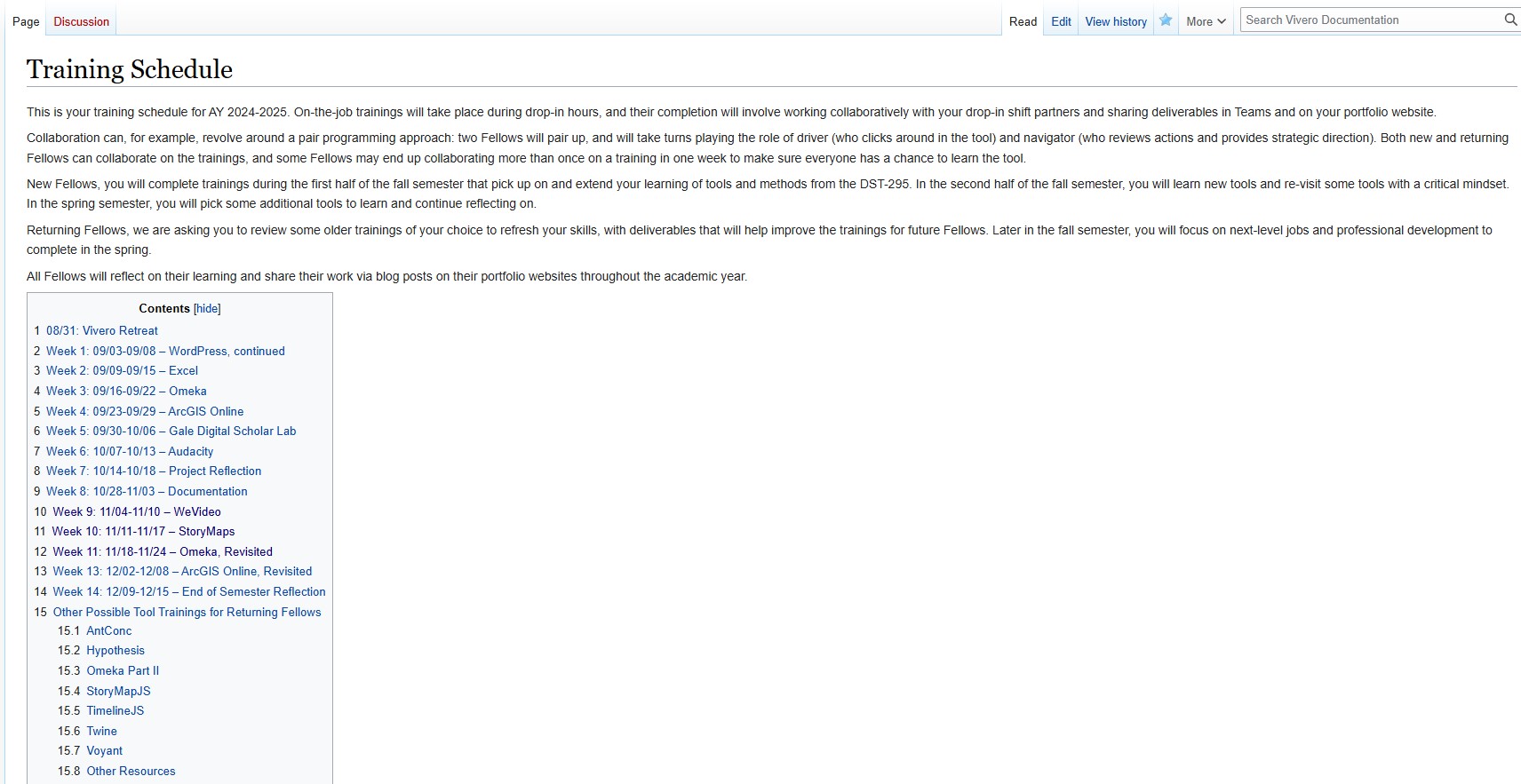
 A screenshot of the Vivero training schedule. The trainings are scheduled over 14 weeks and linked in the schedule.

Each training covers a specific tool (i.e. Excel, Omeka) or skill (Documentation). The trainings are comprised of:

  1. An introduction to the tool, including how to login, find the documentation, and the purpose of the tool.
  2. A deliverable appropriate of the tool that involves hands-on exploring of the tool (i.e. charts made from local census data, a StoryMap featuring their favorite piece of media). Typically, we try to allow students to connect the deliverable to something that interests them, so they are more motivated to complete the task.
  3. Reflection questions about their comfort with the tool, what they find useful or confusing about the tool, and critical questions about the tool’s features.
  4. Examples of other projects that use the tool so they can get an idea of how the tool is used practically
 

The deliverables and answers to the reflection questions are due weekly in the fall semester and are posted on the Fellow’s personal portfolio site. At the beginning of the academic year, each Fellow is given a WordPress portfolio site that is hosted through our institutional hosting service, Sites@Grinnell. We cover the first basic training in WordPress and cPanel during our Fall retreat (see above) and students are then encouraged to build their skills by personalizing their page with new themes, navigation, media and more. We find this to be an effective method for increasing Fellows’ comfort and skills in website design while also training them in other tools. This also serves as a portfolio they can use to demonstrate their skills to future employers. Most of the Fellows take advantage of these portfolios by showcasing their creativity or by building out a professional CV website. With permission from the Fellows, we link some of the portfolios on our Fellows page for example.

Administration

Managing students who work mostly in unsupervised evening shifts and independently on different projects is challenging. The Co-leads each spend a significant portion of their work week on administration of the program and are always learning from trial and error to optimize the process.

Teams Channels

One of our key resources is a dedicated Vivero Microsoft Teams group that only Fellows and the Co-leads have access to. In this Teams page, we have a “General” channel where we post messages to all the Fellows. This includes our Monday updates that remind Fellows of the trainings that are due that week, when timesheets are due, and other announcements. Each Fellow also has a private channel shared only with co-leads so they can store documentation files, message co-leads, and fill out their worklogs.

Worklogs

The Fellows’ Worklogs are stored in Teams. Each semester, Co-leads create a worklog for each Fellow. Fellows are expected to fill out the worklog every time they work with a detailed description of what they did. It can be a challenge to get students to complete these, but we have found that it is invaluable to keep track of what students are working on, if they are meeting with their Project Lead regularly, and if they need more structure or support. Therefore, we make it a core requirement of the position to fill out the worklogs and reinforce their importance often. We instruct the Fellows to set goals for the week, let us know if they have questions, list their worked time in minutes, and to give us a description of their work that is detailed enough that we could check what they worked on (i.e., “Project work” isn’t detailed enough, but “worked on the metadata for Project’s collection” is detailed enough). The worklog descriptions also serve as basic documentation and Fellows can refer to it to to remind themselves of decisions that were made for the projects, where they left off on certain steps, etc. An example of our worklog and how it is used by a student can be found here.

The co-leads check the worklogs weekly for completion and to see if Fellows are meeting goals for their projects, working too many or too few hours, and if they are spending an inordinate amount of time on specific tasks. The worklogs can provide indication that a Fellow might be struggling. For example, some students who work less than 5 hours a week often struggle with a lack of structure or direction from their projects or Project Leads, and we can give the Fellow more structure before things snowball. In another example, we discovered that a student was painstakingly transcribing audio files by hand when her worklogs reflected the amount of time they spent on it, and we were able to redirect them to available tools that made the process much easier.

Check-in Meeting and Documents

We go over the worklogs and other items with individual check-in meetings with each Fellow, once every two weeks. The co-leads set aside one afternoon a week, and we schedule each student for a 20-minute meeting on alternating weeks, so co-leads meet with about half the Fellows every week. Each check-in typically follows the same format: project updates from the Fellow, review of worklogs or timesheets from the co-leads, a review of the Fellow’s recent training deliverable by the co-leads, any other updates, and any remaining questions from the Fellow. If the Fellow has an issue that takes more than 20 minutes to address (for example, an in-depth technical question), another meeting can be scheduled.

All the information from the check-in is noted in the Fellow’s a check-in document that is maintained by the co-leads. This document is only for the co-leads’ use as it can contain sensitive information about a Fellow’s situation. The co-leads add their notes from reviewing the Fellow’s timesheets, worklogs, and other communications in the check-in document prior to meeting with the student. This document is important from a Human Resources perspective as it details patterns of behavior and what coaching or other steps were taken to support the student. It also is helpful for co-leads to remind themselves of what individual fellows are working on and what agreements were reached. A sample check-in document can be found here.

Challenges

Despite how much time we as co-leads spend on our current administrative model, we feel that there is room for improvement. Meeting fellows only every other week makes it easier for issues to slip through cracks. With independent project work, it can also be difficult to monitor a fellow’s actual impact on a project without regular feedback from the project lead. Keep these potential issues in mind as you develop your administrative model!

Project Recruitment

Vivero recruits projects from across campus, from both faculty and staff project leads alike, taking an expansive approach to what falls under the umbrella of “digital scholarship” (see the Projects page for an overview of past and present Vivero projects). Typically, Vivero recruits projects in the early summer for the following academic year, asking prospective project leads to indicate their interest and to pull together a project description that provides an overview of project goals and the work a Fellow would contribute. (We regularly meet with first-time project leads to help them frame and scope their projects, as needed.) There is an expectation that Fellows are true collaborators on a project: while their project duties may involve some “grunt work” (like data entry), as a whole their role should allow them to contribute creatively and meaningfully to the project. We then evaluate project descriptions and accept as many projects as we have Fellows to staff, assessing how well projects match the Vivero program’s stated goals if we cannot accept all viable projects.

Community-building as a Cohort

Threaded throughout the Vivero program is the idea of intentionally building community as a cohort, creating the sense of co-leads, Fellows, and project leads as collaborators in a digital scholarship community of practice. To this end, all weekly trainings are considered collaborative, and the expectations is that Fellows will work on them together during their drop-in hours. Fellows are trained in Peer Mentoring to help other students with their digital projects, and fellows often work as team in mentoring sessions to troubleshoot issues and provide expertise. The program also holds in-person retreats at the beginning of each semester (with the fall retreat focusing on skills and logistics, and the spring retreat focusing on community-building, often through making activities). We have also newly-implemented an end-of-year showcase, which allows Fellows to show off their work to each other, the wider Vivero community of project leads and affiliated staff, and the campus community as a whole. 

css.php